



Ever Square, Edmonton, AB — Completed commercial development by Eleven Architects. Image showing different stages of the creative process courtesy of Eleven Architects.
Some architectural projects start with a blank site. Others start with a puzzle. An existing building that needs to be reimagined. A constrained urban site. Multiple uses competing for the same space. Technical requirements that have to coexist with an architectural vision. For architects, creativity isn't simply about imagining what's possible. It's about finding innovative ways to work within the constraints of what's practical.
An idea might begin as a sketch, become a 3D model, develop into a detailed building design and eventually turn into hundreds of drawings and documents that other people will use to construct it. Along the way, architects explore alternatives, coordinate information, refine details and create visualizations that help clients understand spaces that don't yet exist.
At Eleven Architects, that process moves across a broad digital toolset. AutoCAD and Revit support technical drawings and building documentation. SketchUp and Rhino are used for 3D modelling. Twinmotion and V-Ray turn those models into architectural visualizations, images and animations. Photoshop, Illustrator and InDesign support diagrams and presentations, while Bluebeam Revu helps with document workflows.
And those applications don't necessarily get used one at a time.
The workstation needs to keep up as an architect moves between modelling, documentation, visualization and communication - sometimes while a render is still running in the background.
The workstation doesn't design the building. It gives the architect more freedom to explore it.
For Eleven, that made computing performance an important part of building the firm's digital workflow.
The Challenge: Keeping Up With the Design Process
Shortly after starting the business, Eleven needed workstations capable of supporting 3D modelling, architectural visualization, animations and flythroughs, and CADD drafting for construction documents across its growing portfolio.
Its previous computers were lacking the speed and performance required for increasingly demanding architectural work.
The firm was also investing in 4K designer monitors and wanted its new workstations to perform smoothly across a high-resolution environment.
But raw performance wasn't the only consideration.
As a start-up architecture practice, Eleven needed to be thoughtful about where it invested. Memory and graphics performance were priorities, but the firm didn't want to pay for expensive hardware that wouldn't provide a meaningful benefit to its workflow.
Since the computers would sit in the studio alongside the architects using them every day, there were practical considerations too. The systems needed to look professional and operate as quietly as possible.
The Solution: Built Around the Architectural Workflow
Rather than choosing a pre-configured workstation, Eleven worked with Quoted Tech to customize systems around the way the firm actually works.
Eleven had found that pre-assembled systems often forced a compromise: one might have the processor it wanted but insufficient memory; another might have the graphics performance but cost considerably more for the overall hardware.
Customization allowed the firm to prioritize what mattered.
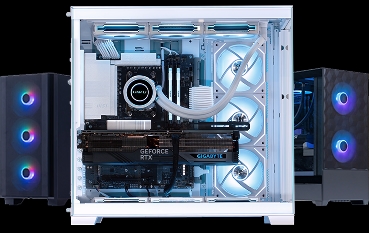
The resulting Quoted Tech workstation combines an AMD Ryzen 9 9950X processor, NVIDIA GeForce RTX 5080 graphics, 128GB of DDR5 memory and high-speed NVMe storage, providing resources for modelling, BIM, documentation, visualization and multitasking.
Liquid cooling addressed another of Eleven's priorities by helping create a system appropriate for a quiet professional workspace, while the understated case fit naturally into the firm's studio.
Eleven also appreciated something much simpler: the systems arrived without unnecessary pre-installed software.
For a growing practice ordering multiple machines, Quoted Tech also provided consistency. Eleven could configure the workstations it needed without having to piece together different systems based on whatever components happened to be available.
More Time Designing. Less Time Waiting.
The impact becomes most apparent when the design work gets complicated.
Architectural models don't necessarily stay small.
A visualization might require an entire city block to provide context around a proposed building. Parametric models can grow increasingly detailed as a design develops. High-resolution materials, geometry and project information accumulate. Meanwhile, the architect may need to continue working while a visualization is rendering.

Ever Square South, Edmonton, AB - Proposed commercial development. Image courtesy of Eleven Architects.
Eleven says its Quoted Tech workstations have changed what the team can comfortably do.
The architects can multitask on project work while rendering, create larger parametric models without the same performance issues and work with highly detailed 3D files while the machines keep pace with the geometry.
The firm has also seen a significant reduction in rendering times and fewer instances of freezing or crashing when working with large files.
Those improvements don't just make the computers feel faster.
They affect how the practice works.
With less time spent waiting for the workstation, Eleven says it can commit to shorter timelines for clients.
When Reliability Becomes a Business Advantage
For a small architecture practice, workstation reliability can be just as important as benchmark performance.
A computer problem doesn't only inconvenience the person sitting at the desk. It can interrupt a render, delay documentation and take an architect away from billable project work.
Nearly two years after purchasing its Quoted Tech systems, Eleven says it hasn't experienced a single hardware issue.
“We have been very pleased with the reliability of our workstations. Nearly two years into our purchase, we have not had a single issue with the hardware we purchased. As a small business and architecture firm, computer issues result in lost production but these machines have been flawless to date.”
That's particularly meaningful because the systems have been part of Eleven's workflow almost from the beginning.
The firm purchased its first Quoted Tech workstations shortly after starting the business. Since then, they've supported everything from web development and construction documentation to 3D modelling and architectural visualization.

Rhodium, Edmonton, AB - Multifamily development, in progress. Image courtesy of Eleven Architects.
According to Eleven, nearly everything on the firm's website and Instagram account has been produced in some way using a Quoted Tech computer.
Technology That Stays Out of the Way
Architecture is ultimately about ideas - not computer specifications.
The processor doesn't decide how an existing building should be transformed. The graphics card doesn't determine how a new space should feel. More memory doesn't solve a difficult site.
Those decisions still belong to the architect.
But as architectural work becomes increasingly digital, the tools used to explore those decisions matter.
A workstation that can manipulate a larger model, generate a visualization faster or continue responding while other work is being processed gives the architect something valuable: more room to iterate.
For Eleven Architects, that meant configuring systems around the firm's actual workflow - balancing CPU performance, graphics, memory, storage, acoustics and budget rather than simply buying the biggest workstation available.
The result is technology that does what a good professional tool should do: keep up with the person using it.