



When configuring or purchasing a prebuilt gaming desktop, deciding between All-In-One (AIO) liquid cooling and traditional air cooling is one of the most critical structural choices. Modern processors from both Intel and AMD pack higher transistor densities into smaller silicon dies, creating higher thermal density per square millimeter under heavy gaming or multi-threaded workloads.
Inadequate thermal management leads directly to thermal throttling, forcing the CPU to downclock its boost frequencies to protect itself from overheating — resulting in dropped frames, poor 1% low frame pacing, and audible fan noise.
This technical guide breaks down the fluid-dynamic, acoustic, and long-term reliability differences between liquid and air cooling, supported by third-party reviewer benchmarks and featured Quoted Tech prebuilt architectures.
1. Technical Mechanics Comparison Matrix
| Technical parameter | AIO liquid cooling (240mm / 360mm) | Dual-tower air cooling |
|---|---|---|
| Heat dissipation mechanism | Liquid coolant transfers heat via coldplate to radiator at case perimeter. | Heat pipes transfer heat via conduction directly to aluminum fin stack near socket. |
| Sustained thermal capacity | High (250W–350W+ TDP) | Moderate-high (180W–240W TDP) |
| System ambient impact | Exhausts heat directly outside the case via radiator fans. | Disperses hot exhaust directly into the interior case chamber. |
| Acoustic profile (full load) | Sub-40 dB (larger radiator surface area allows lower fan RPM). | 38 dB – 45 dB (requires higher fan RPM under sustained load). |
| RAM & PCIe clearance | Uninhibited (compact CPU block fits cleanly around RAM slots). | Restricted (large fin stacks may overhang tall DDR5 RGB heatsinks). |
| Moving components | Pump motor + 2 or 3 radiator fans. | 1 or 2 heatsink fans only. |
| Expected lifespan | 3–7 years (pump wear / eventual micro-evaporation). | 10+ years (only fans require eventual replacement). |
2. In-Depth Architectural Comparison
A. Thermal headroom & heat dissipation path
Air coolers rely on conductive copper heat pipes filled with a small amount of liquid that vaporizes and condenses to move thermal energy away from the CPU coldplate into an aluminum fin array. However, because the heatsink resides directly above the CPU socket, hot exhaust air is dumped inside the system chassis, elevating internal ambient temperatures for nearby components like GPU voltage regulator modules (VRMs) and M.2 NVMe SSDs.
In contrast AIO liquid coolers transfer thermal energy through liquid coolant pumped directly to a dedicated radiator mounted along the outer perimeter of the chassis. This design evacuates heat directly out of the system, keeping internal ambient air cooler and preventing CPU heat saturation during extended gaming sessions.
B. Acoustics and fan RPM dynamics
Acoustic output is dictated by surface area. A 360mm AIO liquid cooling radiator features roughly triple the convection surface area of a standard air cooler heatsink.
According to noise-normalized benchmarks, larger radiators allow 120mm or 140mm static pressure fans to spin at lower RPMs while dissipating identical power loads. This allows liquid-cooled systems to operate below 40 dB under load, whereas air-cooled systems must ramp fan speeds up to maintain acceptable operating temperatures.
C. Reliability, maintenance, and form factor
Air coolers excel in simplicity and longevity. With zero liquid or mechanical pumps, the only failure point on an air cooler is the cooling fan itself, which can be swapped in minutes.
AIO liquid coolers introduce a mechanical pump motor and sealed liquid loops. While modern closed-loop liquid systems are factory-sealed and require zero user fluid maintenance, pump motors generally have an operational lifespan of 5 to 7 years.
3. How Quoted Tech Optimizes Cooling Across System Tiers
Quoted Tech builds utilize dedicated cooling configurations matched precisely to each CPU tier’s Thermal Design Power (TDP) and boost architecture.
-
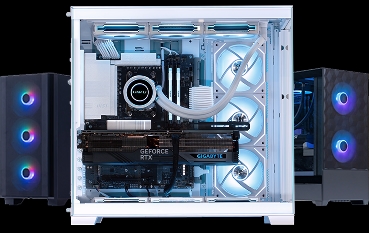
High-TDP flagship & mid-range builds: the Horizon Series
- Cooling solution
- 240mm or 360mm all-in-one liquid cooling
- Target processors
- AMD Ryzen 7 9800X3D, Intel i9 / Ultra 9, Intel Core i7-14700KF
- Thermal performance
- Paired with an open-mesh chassis, Horizon prebuilts hold sustained CPU package temperatures between 68°C and 72°C under 100% synthetic stress testing (Cinebench R23 / FurMark).
-
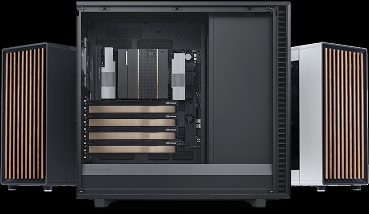
Entry-level & esports builds: the Shield Series
- Cooling solution
- High-density single or dual-tower air cooling
- Target processors
- Ryzen 7 7800X3D, Ryzen 7 5700
- Thermal performance
- For mid-range 65W–150W TDP processors, a high-density air cooler provides ideal thermal headroom, keeping gaming temperatures below 65°C while eliminating pump complexity entirely.
4. Prebuilt Buyer Decision Checklist
Choose liquid cooling if
- You are purchasing a high-tier processor (AMD Ryzen 7 9800X3D, Ryzen 9, Intel i7/i9) that generates high thermal density during sustained loads.
- You prioritize near-silent system acoustics (<40 dB) during heavy gaming.
- You prefer unobstructed RAM module visibility and cleaner internal cable aesthetics.
Choose air cooling if
- You are purchasing a mainstream processor or older generation (Ryzen 7 7800X3D, Ryzen 7 5700) with a conservative thermal footprint.
- You want maximum long-term mechanical reliability with zero moving parts beyond standard case fans.