



Why the fastest components don’t always build the fastest system.
When configuring a professional workstation, it’s tempting to focus on individual specifications: the fastest processor, the most powerful graphics card, the largest amount of memory, the quickest SSD.
But workstation performance isn’t determined by a single component. It’s determined by how well every component works together. The fastest workstation isn’t necessarily the one with the highest specifications — it’s the one that’s engineered as a balanced platform around the applications and workflows it was designed to run.
Every Workstation Is a System
Think of a workstation like an orchestra. A world-class violinist cannot compensate for an out-of-tune orchestra. Likewise, the most powerful processor cannot deliver its full potential if memory, storage, cooling, or graphics become bottlenecks.
Professional computing is about eliminating constraints — not simply maximizing specifications.
The Five Pillars of Workstation Performance
Every high-performance workstation relies on five major components working together in harmony.
1. Processor (CPU)
The CPU performs calculations and manages system resources, but its effectiveness depends on selecting the right balance of core count, clock speed, cache, and memory bandwidth. Standard consumer CPUs excel in single-threaded tasks and offer modest core counts, such as the AMD Ryzen 7 9800X3D with 8 cores and 16 threads. However, heavy commercial workloads — including complex CAD assemblies, 3D CPU rendering, and large-scale AI data preparation — benefit significantly from the high thread counts and elevated multi-core performance of workstation processors, such as the enterprise-class AMD Threadripper PRO 9985WX with 64 cores and 128 threads.
2. Graphics (GPU)
Modern professional applications lean on GPU acceleration for rendering, visualization, AI, simulation, and video production. But performance depends on more than raw throughput — it depends on VRAM capacity, memory integrity, and sustained thermal headroom.
The NVIDIA GeForce RTX 5090 is fast, and its 32GB handles most creative pipelines and 7B–14B class models well. What it lacks is capacity and production readiness: no ECC memory, consumer driver branch, and GeForce license terms that restrict data-center deployment.
The NVIDIA RTX PRO 6000 Blackwell changes the math. 96GB of ECC GDDR7 holds a 70B model in FP8 on a single card, and ECC means a multi-day run isn't silently corrupted by a bit flip.
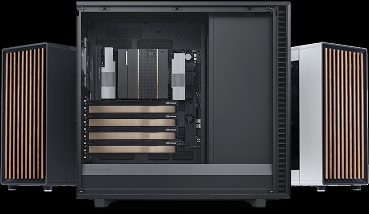
Scaling past one card is a density problem, not an interconnect one — both GPUs talk over PCIe Gen 5, neither uses NVLink. The question is whether four cards physically fit, stay cool, and stay fed. A 575W triple-slot consumer card can't; the 300W dual-slot Max-Q is built for exactly this, which is why NVIDIA rates it for up to four GPUs.
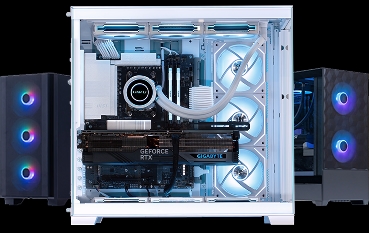
The Quoted Edge Workstation is engineered around that: full PCIe 5.0 lanes to every slot, power sized for sustained four-card load, and front-to-back airflow that holds rated clocks under continuous work. Up to 384GB of aggregate ECC VRAM in one chassis, on certified enterprise drivers.
3. Memory
Insufficient memory forces applications to move data to storage, dramatically reducing performance. Excess memory that remains unused provides little benefit.
32GB to 64GB of high-speed DDR5 is ideal for gaming, 3D modeling, and standard video editing. Heavy multi-tasking, high-resolution VFX, and large dataset processing require 128GB+ with verified EXPO/XMP profiles enabled in BIOS. For critical enterprise tasks, Error-Correcting Code (ECC) memory prevents system crashes caused by instability during heavy data transfers.
4. Storage
High-speed NVMe storage reduces loading times and accelerates data-intensive workflows. However, storage architecture matters just as much as storage speed.
Rather than relying on a single large drive, a balanced setup uses a dedicated PCIe NVMe drive for the operating system and applications, a high-speed PCIe Gen 5 NVMe for active project files, and separate scratch drives for cache or media storage. While slower formats like mechanical HDDs are now obsolete for OS and application usage, they remain a highly cost-efficient solution when deployed as high-capacity secondary data banks for cold storage and archival backups.
Furthermore, integrating RAID configurations adds critical utility to your storage architecture — whether running RAID 0 across NVMe drives to maximize throughput for ultra-fast scratch disks, or utilizing RAID 1 / RAID 10 across storage drives for real-time data redundancy to protect mission-critical enterprise projects against hardware failure.
5. Cooling
Performance means little if the system cannot sustain it. Without adequate cooling, processors and graphics cards reduce clock speeds through thermal throttling.
A high-airflow chassis paired with a 360mm AIO liquid cooling loop ensures workstations maintain peak boost clock speeds during sustained rendering, simulation, and training runs while keeping acoustics below 40 dB.
Navigating Graphics Silicon: GeForce vs. Blackwell
Selecting the right graphics hardware comes down to your software’s dataset size, precision requirements, and power budget.
-
GeForce RTX 5090 (32GB)
- Ideal workload fit
- 4K video, Unreal Engine 5, 3D animation, local AI (under 32B parameters)
- Key advantage
- Top-tier consumer speed, DLSS acceleration, and massive GDDR7 bandwidth at high power (575W).
-
RTX PRO 6000 Blackwell (96GB)
- Ideal workload fit
- Large language models (70B+ parameters), high-end CAD, scientific AI, server deployment
- Key advantage
- Massive 96GB GDDR7 ECC frame buffer fits enterprise datasets natively without host-RAM offloading.
-
RTX PRO 6000 Blackwell Max-Q (96GB)
- Ideal workload fit
- Dense multi-GPU rack workstations or servers
- Key advantage
- Full 96GB VRAM pool optimized for a tight 300W power budget, prioritizing density
One Weak Link Creates a Bottleneck
Every professional workload depends on multiple components working together. Consider an AI workstation: a powerful GPU cannot train models efficiently if the processor cannot prepare data quickly enough, memory capacity is insufficient, storage cannot supply training datasets fast enough, or thermal throttling forces the system to slow down.
The graphics card isn’t the bottleneck — the system is. The same principle applies to CAD, simulation, video editing, scientific computing, and geospatial analysis.
Every Workload Is Different
Different applications place different demands on workstation hardware. No single configuration is ideal for every organization.
| Workload | Primary priority | Recommended component fit |
|---|---|---|
| CAD design | High clock-speed CPU | AMD Ryzen 7 9950X, NVIDIA RTX 5080, 32GB DDR5, 1TB SSD |
| AI development | GPU memory buffer & PCIe lanes | AMD Threadripper PRO, RTX PRO 6000 Blackwell (96GB), 128GB DDR5, 2TB SSD |
| Video production | Balanced CPU, GPU & multi-drive storage | Ryzen 9 9950X, RTX 5080, 64GB DDR5, 4TB SSD |
| LiDAR processing | CPU, high memory capacity & NVMe | AMD Threadripper PRO, NVIDIA Blackwell 6000, 128GB DDR5, 2TB SSD |
| Scientific computing | CPU, memory bandwidth & reliability | AMD Threadripper PRO, NVIDIA Blackwell 6000, 64GB DDR5, 4TB SSD |
| BIM & architecture | Balanced CPU, GPU & high RAM | Ryzen 7 9800X3D, NVIDIA RTX 5090, 64GB DDR5, 2TB SSD |
The Cost of Overbuilding
One of the most common mistakes is spending too much budget on a single component. For example:
- Purchasing a flagship processor while limiting memory capacity.
- Installing a high-end GPU but using slow, single-drive storage.
- Buying additional CPU cores that your primary software cannot utilize.
- Choosing premium hardware without adequate cooling to sustain boost clocks.
These imbalances increase cost without delivering proportional performance improvements. A balanced workstation frequently outperforms a more expensive but poorly matched configuration.
Engineering Insight
At Quoted Tech, we don’t engineer workstations by selecting the fastest individual components. We begin with your applications:
- How does your software process data?
- Which tasks consume the most time?
- Where are the current bottlenecks?
Only then do we design a platform where the processor, graphics, memory, storage, cooling, and expansion capabilities complement one another. Every system undergoes bench calibration, including BIOS tuning to ensure high-speed RAM runs at full rated speeds (XMP/EXPO) out of the box with zero corporate bloatware.
The Balanced Workstation Checklist
Before selecting a workstation, ask these questions:
- Is the processor optimized for my applications? (High clock speed vs. high core count)
- Does the GPU have enough VRAM for my largest projects? (32GB for general workflows vs. 96GB for heavy AI/enterprise tasks)
- Is there sufficient memory for my datasets? (Including active EXPO/XMP profiles or ECC protection)
- Is the storage architecture designed for performance, not just capacity? (Separating OS, active files, and scratch space)
- Will the cooling system maintain sustained performance under full load?
- Is there room for future GPU, storage, or networking upgrades?
If the answer to any of these questions is “no,” the workstation may contain a bottleneck that limits overall performance.
Studies of professional workstation deployments consistently show that performance bottlenecks are more often caused by an imbalance between components than by the processor or graphics card alone. Eliminating the weakest link in the system frequently delivers greater productivity gains than upgrading the most powerful component.
Should I spend more on the processor or the graphics card?
The answer depends entirely on your workload. CAD applications and BIM software benefit from faster single-core CPUs, while AI development, 3D rendering, and video production rely heavily on GPU compute and VRAM capacity. Many workflows require a carefully tuned balance across CPU, GPU, memory, storage, and cooling. That’s why Quoted Tech engineers every workstation around the applications you use, not a one-size-fits-all specification sheet.